Universities & Organisations
Using Thothly with a university
How a university sets up its higher degree students, staff and placement supervisors, step by step.
A higher degree student’s programme gets the university’s paid features once it’s linked to the university’s organisation. Here’s who does what.
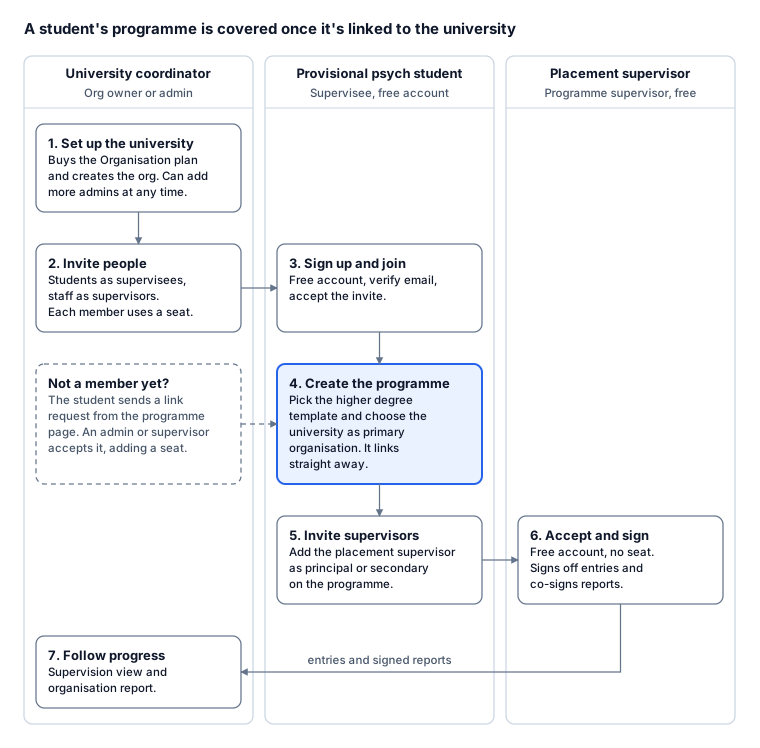
On a small screen, tap the chart to open it full size.
Step by step
- Coordinator sets up the university. Buy the Organisation plan, then create the organisation under Account > Organisations. You’re its owner. Add colleagues as admins so more than one person can run it.
- Coordinator invites people. Invite students as supervisees and academic staff as supervisors. Each active member uses a seat.
- Student joins. They sign up for free, verify their email and accept the invite.
- Student creates the programme. They pick Higher degree pathway: Masters placements or Doctoral placements, and choose the university as the primary organisation. That links the programme straight away: unlimited entries, PDF exports, signed reports and adding supervisors.
- Student invites supervisors. From the programme page they add each placement supervisor as a principal or secondary supervisor.
- Placement supervisor accepts and signs. Supervising is free and doesn’t use a seat. They sign off entries and co-sign the student’s reports.
- Coordinator follows progress. The Supervision view shows every linked programme, its supervisors and sign-offs, and the organisation report summarises the cohort.
Students who aren’t members yet
A student can send a link request from their programme page using the university’s exact name or email. Any admin or supervisor accepts it under Organisations. Accepting adds the student as a supervisee, which uses a seat.
Who pays
- The owner’s Organisation plan pays for every active member: admins, staff and students. The minimum is 5 seats.
- Placement supervisors added to a programme are free.
- If the plan ends, students keep their entries but their programmes go back to Free limits at the end of the paid period. Renewing restores them.
Troubleshooting
- A student’s programme is still on Free limits
- Check the programme page shows the university under Attached organisation. If not, the student can edit the programme and pick the university as primary organisation (they must have accepted the invite first). Also check their seat is active under Manage Seats and the university’s plan hasn’t ended.
- A student can’t find the university in the primary organisation list
- The list only shows organisations they belong to. Ask them to accept their invite (check spam), or send a link request instead.
- A staff member can’t sign a student’s entries
- Organisation supervisors can only sign when the student allows it under Supervisor Access Settings. For placement supervision, add the supervisor to the programme instead. See Organisation and programme supervisors.
- The wrong programme is linked
- The student can unlink it from the programme page, or an admin can unlink it from the Supervision view. Entries aren’t touched.